
Google SEO Audit: A Practical Guide to Improving Your Website
A Google SEO audit is a structured review of a website’s technical setup, content and authority. It helps identify issues that may make pages harder for Google to crawl, understand or show in search results. An audit cannot guarantee higher rankings, but it can reveal useful opportunities and help you prioritise improvements.
What does a Google SEO audit cover?
SEO covers more than keywords. A thorough audit looks at how search engines access your website, whether your pages meet users’ needs, and how clearly your site communicates its subject matter. It usually includes:
- Technical SEO, including crawling, indexing, site speed and mobile usability
- On-page SEO, such as page titles, headings, internal links and content quality
- Content coverage, including relevance, accuracy and duplication
- Website authority and the quality of links pointing to your site
- Local SEO, where a business serves customers in a particular area
Check crawling and indexing
Start by checking whether Google can access and index the pages you want people to find. Google Search Console is a useful place to review indexing reports, inspect individual URLs and identify issues reported by Google.
Check that important pages are not unintentionally blocked by your robots.txt file or marked with a noindex directive. Review your XML sitemap, too: it should include canonical, indexable URLs that you want Google to discover. A page appearing in a sitemap does not guarantee that it will be indexed.
Pay attention to duplicate or very similar URLs. Correct canonical tags and consistent internal links can help indicate which version of a page should be treated as the main one.
Review your website’s technical health
Technical issues can affect both search engines and visitors. Check for broken links, redirect chains, server errors and pages that load inconsistently. Make sure your website uses HTTPS and that key pages work properly on mobile devices.
Page experience is also worth reviewing. Google’s Core Web Vitals measure aspects of loading performance, interactivity and visual stability. Google PageSpeed Insights can help you assess individual pages and identify possible improvements, such as reducing large images or unnecessary scripts. Treat its recommendations as a starting point: test changes carefully and consider the experience of real users as well.
Assess on-page SEO
Each important page should have a clear purpose and a descriptive title. Review page titles and meta descriptions to ensure they accurately summarise the content and make sense to potential visitors. Google may generate or alter search snippets, so these elements should be helpful rather than treated as guaranteed display text.
Use headings to organise the page logically. Include relevant terms naturally, but avoid forcing keywords into every heading or paragraph. Check that images have appropriate alternative text when they convey useful information, and that links use descriptive wording.
Evaluate content quality and search intent
Useful content answers the questions visitors bring to a page. Review your important pages for accuracy, clarity, originality and completeness. Ask whether each page offers meaningful value, is written for its intended audience and is kept up to date where necessary.
Compare the purpose of each page with the likely intent behind the searches you want to reach. Someone looking for a quick definition may need a different page from someone comparing services or ready to make a purchase. Avoid creating multiple pages that target the same topic in nearly identical ways; consider improving, combining or redirecting overlapping content where appropriate.
Check internal links and site structure
A clear site structure helps visitors find information and helps search engines discover how pages relate to one another. Make sure important pages can be reached through relevant internal links, rather than being isolated. Use descriptive anchor text and organise related pages into sensible sections.
Review navigation and page depth as well. If a valuable page is difficult to find, consider whether it needs a more prominent link from a relevant section of the site.
Review backlinks and reputation
Links from other websites can help people discover your content and provide context about your site. Review your backlink profile for patterns that appear unnatural or manipulative, but do not assume that every low-quality link requires action. Google’s systems generally assess links automatically.
Focus on earning relevant, genuine links by publishing useful material and building relationships within your industry. The disavow tool is intended for specific cases involving a substantial number of spammy or artificial links and a manual action, or a strong likelihood of one. It should not be used as a routine clean-up tool.
Include local SEO checks where relevant
If your organisation serves a local area, check that its business details are accurate and consistent across its website and relevant directories. Maintain a complete Google Business Profile, choose suitable categories and provide clear information about services, opening hours and locations.
Local landing pages should offer useful, location-specific information. Avoid publishing many near-identical pages that simply swap one town name for another.
Tools for a Google SEO audit
You can carry out many audit checks with a combination of tools:
- Google Search Console: review search performance, indexing and site issues.
- Google Analytics: understand how visitors interact with your website, when configured appropriately.
- PageSpeed Insights: assess page performance and Core Web Vitals data.
- URL Inspection tool: check how Google views a specific URL and request recrawling when appropriate.
- Rich Results Test: test eligible structured data for supported rich results.
- Crawling software: find broken links, redirect issues, missing metadata and other site-wide patterns.
Use tools to guide investigation rather than treating every warning as a ranking problem. Prioritise findings according to their impact on visitors and important pages.
How often should you conduct an SEO audit?
A full audit is useful when launching a website, making a major redesign, changing a domain or seeing a significant shift in search performance. For an established site, regular monitoring and a more detailed review every few months can help catch issues early. The right frequency depends on the size of the site and how often its content or technology changes.
Turn audit findings into an action plan
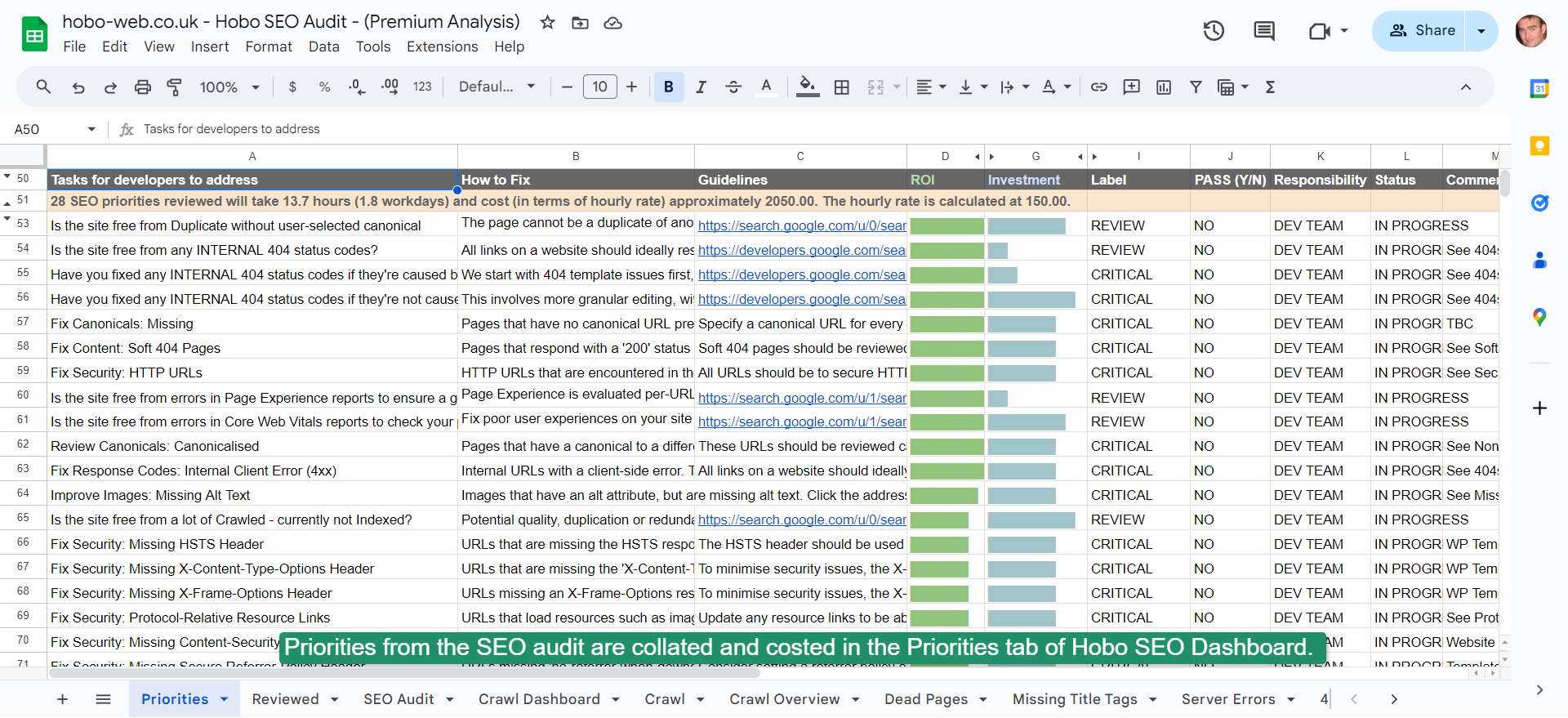
An SEO audit is most valuable when it leads to clear, prioritised action. Record each issue, the affected pages, its likely impact and the recommended fix. Address critical crawling, indexing and security problems first, then work through improvements to content, internal linking and performance.
After making changes, monitor relevant data in Google Search Console and your analytics platform. Search results can take time to reflect updates, and performance may be influenced by many factors beyond your website. Regular review helps you understand what is working and where further improvements are needed.
Google SEO Audits: Your Top 6 Questions Answered
- What is a Google SEO audit?
- How do I audit my website for Google SEO?
- Which tools can I use for a Google SEO audit?
- How often should I conduct a Google SEO audit?
- How long does a Google SEO audit take?
- How much does a Google SEO audit cost?
What is a Google SEO audit?
A Google SEO audit is a review of a website to identify factors that may affect how Google crawls, indexes and ranks its pages. It typically assesses technical health, content quality, page titles and headings, mobile usability, site speed, internal links and backlinks, highlighting problems to fix and opportunities to improve visibility in search results. An audit can guide SEO improvements, but it cannot guarantee higher rankings.
How do I audit my website for Google SEO?
To audit your website for Google SEO, start with Google Search Console to check indexing, crawl issues and search performance, then review your key pages for useful, accurate content, clear titles and headings, descriptive internal links and appropriate mobile usability. Check your XML sitemap, robots.txt file, redirects and broken links, and use PageSpeed Insights to identify performance or Core Web Vitals issues. Prioritise fixes that affect important pages or prevent visitors and Google from accessing content, then monitor the results in Search Console over time.
Which tools can I use for a Google SEO audit?
You can use Google Search Console to check indexing, search performance and website issues, and PageSpeed Insights to assess loading performance and Core Web Vitals. Google Analytics can help you understand how visitors use your site, while the Rich Results Test checks eligible structured data. For a wider technical review, website-crawling tools can identify broken links, redirects and missing page information. Use these tools to guide your investigation, prioritising issues that affect important pages and the experience of your visitors.
How often should I conduct a Google SEO audit?
How often you should conduct a Google SEO audit depends on the size of your website and how frequently it changes. For most businesses, a thorough review every six to twelve months, alongside regular monitoring in Google Search Console, is a sensible approach. Audit sooner after a redesign, domain migration, major content update or a noticeable change in search performance. This helps you spot technical issues and new opportunities before they have a lasting impact.
How long does a Google SEO audit take?
A Google SEO audit can take anywhere from a few hours to several weeks, depending on the size and complexity of your website and the depth of the review. A small site may only need a brief check, while a large website with thousands of pages may require detailed technical, content and backlink analysis. The time needed to implement the recommended changes is separate and will depend on the issues identified.
How much does a Google SEO audit cost?
The cost of a Google SEO audit varies depending on the size and complexity of your website, the depth of the review and whether it includes a prioritised action plan or implementation support. A basic audit for a small website may cost a few hundred pounds, while a detailed audit of a large or technically complex site can cost several thousand pounds or more. When comparing quotes, check what is included, such as technical checks, content analysis, backlink review and recommendations, and ask how the findings will be presented.