
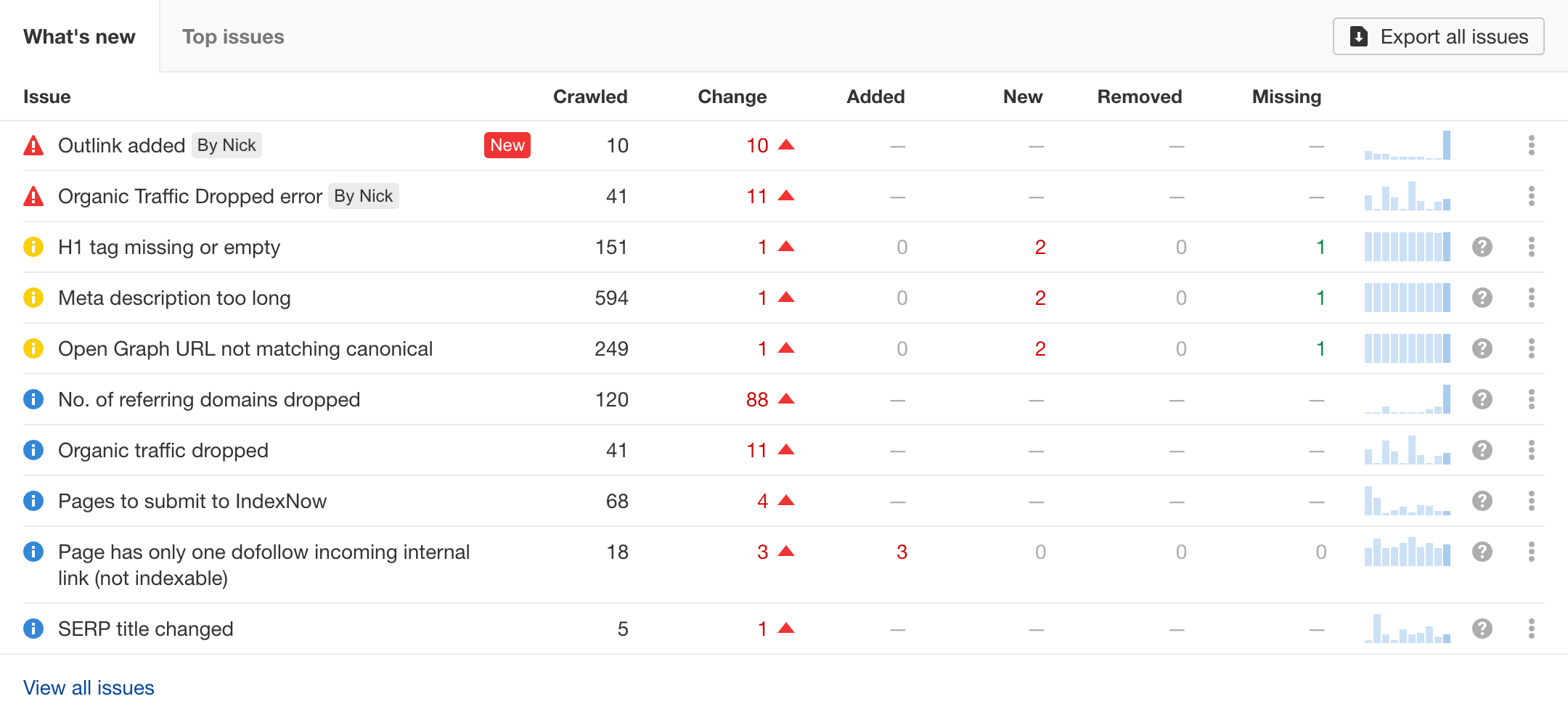
SEO Site Audit: A Practical Guide to Improving Your Website
An SEO site audit is a structured review of a website to identify issues that may affect its visibility in search results, usability and ability to attract relevant visitors. It can reveal technical problems, content gaps and opportunities to make pages clearer and more useful for both people and search engines.
An audit is not a one-off guarantee of higher rankings. Search performance depends on many factors, including competition, the quality of your content and changes to search engine systems. However, a careful audit can help you understand what is working, what needs attention and which improvements are most important.
What does an SEO site audit cover?
A comprehensive SEO audit usually examines several areas of a website:
- Technical SEO: How search engines access, crawl and index your pages.
- On-page SEO: How page titles, headings, content and internal links communicate a page’s purpose.
- Content quality: Whether pages are useful, accurate, original and relevant to the needs of your audience.
- Website performance: How quickly and reliably pages load across different devices and connections.
- Mobile usability: Whether the site is easy to use on smartphones and tablets.
- Links and site structure: How pages connect to each other and whether external links appear natural and relevant.
- Local SEO, where relevant: How well a business’s website and local details support visibility in location-based searches.
Check whether important pages can be indexed
Search engines need to be able to discover and process the pages you want to appear in search results. Start by checking for accidental restrictions, such as “noindex” directives or rules in the robots.txt file that block important sections of the site.
Review the XML sitemap as well. It should include the preferred, indexable URLs you want search engines to find, rather than redirected pages, duplicate URLs or pages that should remain private. Search Console tools can help you investigate indexing issues and see how Google has processed specific pages.
Review site architecture and internal links
A clear site structure helps visitors find information and helps search engines understand how pages relate to one another. Important pages should be reachable through useful navigation and relevant internal links, rather than being isolated or buried several clicks deep.
Look for broken internal links, confusing navigation and pages with few or no links pointing to them. Descriptive link text can also give readers helpful context about what they will find when they follow a link.
Assess page speed and mobile usability
Slow or difficult-to-use pages can frustrate visitors. Test key templates and landing pages on mobile as well as desktop, paying attention to loading time, layout shifts, tap targets, text size and navigation.
Performance tools can highlight issues such as oversized images, unused code or slow server responses. Treat these reports as diagnostic guidance: prioritise problems that affect real users, rather than trying to improve a score without considering the overall experience.
Examine page titles, headings and metadata
Each important page should have a clear, accurate title that describes its content. Check for titles that are missing, duplicated, vague or excessively long. Meta descriptions should summarise the page and give people a useful reason to visit, although search engines may choose to display different text in results.
Headings should make the content easier to scan. Use a clear main heading and organise the rest of the page into logical sections. Headings are for readers first; adding keywords where they fit naturally is preferable to repeating them unnaturally.
Review content for usefulness and accuracy
An SEO audit should look beyond technical checks. Ask whether each important page meets a genuine audience need, answers the question it targets and offers information that is clear, current and trustworthy.
Identify thin, outdated or overlapping pages. Some may benefit from a substantial update; others may be better combined, redirected or removed. Avoid making changes solely because a page is short or has low traffic. Consider its purpose, business value, links and role in the wider site before deciding what to do.
Check for duplicate URLs and canonical issues
The same or very similar content can sometimes be available at multiple URLs, for example through tracking parameters or inconsistent versions of a page. This can make it less clear which URL should be treated as the main version.
Review canonical tags, redirects and URL variations to make sure they support a consistent preferred URL. Canonical tags are signals, not absolute commands, so they should agree with other signals such as internal links, sitemaps and redirects wherever possible.
Review structured data
Structured data can help search engines interpret certain types of content, such as products, events or business information. Check that any structured data on the site accurately reflects visible page content and follows the relevant guidance.
Valid structured data does not guarantee enhanced search results. Use testing tools to identify errors, and avoid adding markup for information that users cannot see on the page.
Check links and website security
Review internal and external links for broken destinations, unexpected redirects and links that no longer support the user journey. For backlinks, focus on natural, relevant references to your site rather than chasing a particular number of links. Avoid manipulative link schemes, which can put a site at risk of search engine action.
Also confirm that the website uses HTTPS correctly and that visitors are not sent through unnecessary or inconsistent redirects.
How to prioritise audit findings
An audit can produce a long list of recommendations. Start with issues that prevent important pages from being crawled or indexed, then address problems that affect many pages or significantly disrupt the user experience. Next, consider improvements to valuable content, internal linking and page-level optimisation.
For each recommendation, record:
- What the issue is and which pages it affects.
- Why it matters to users or search performance.
- How urgent it is and how much effort it may require.
- Who will make the change and how it will be checked.
This turns an audit from a technical report into a practical work plan. After changes are made, monitor relevant metrics over time and check that the fix has not caused new issues.
How often should you conduct an SEO site audit?
The right schedule depends on the size and complexity of your website. A smaller site may benefit from a detailed review once or twice a year, alongside regular checks for new errors. Larger sites, frequently updated websites and online shops may need more continuous monitoring.
It is also sensible to review SEO after a redesign, platform migration, major navigation change or substantial update to a site’s content. Keep a record of changes so that any later movement in performance can be investigated more easily.
Final thoughts
A useful SEO site audit combines technical checks with a close look at content and the visitor experience. The aim is not simply to fix every warning produced by a tool, but to identify the changes most likely to make the website easier to find, understand and use.
By addressing issues in a sensible order, measuring the results and repeating the process when the site changes, businesses can build a stronger foundation for sustainable organic search performance.
SEO Site Audits: 19 Frequently Asked Questions About Costs, Tools and Checklists
- What does a SEO site audit do?
- How do I audit my SEO site?
- What are the steps in SEO audit?
- How much should I pay for an SEO audit?
- How do you conduct SEO site audit?
- Is an SEO audit worth it?
- How to do SEO audit in 2022?
- How much does SEO website audit cost?
- How much is SEO site audit?
- How to audit a site for SEO?
- How do you audit a website to identify the SEO problem?
- Can I get a quality SEO audit for free?
- Is there a free tool for SEO site audit?
- How do you do a site audit?
- How do I do a SEO audit?
- How do I audit a website to identify SEO problems?
- Do SEO site audits free?
- What is needed for an SEO audit?
- What is an SEO Audit Checklist?
What does a SEO site audit do?
An SEO site audit reviews your website to identify issues and opportunities that may affect its visibility in search results. It checks areas such as technical setup, page content, site structure, mobile usability, page speed and internal links, then helps prioritise practical improvements so search engines can understand your site and visitors can use it more easily.
How do I audit my SEO site?
To audit your SEO site, start by checking whether important pages can be crawled and indexed, then review your site structure, internal links, page titles, headings, content and mobile usability. Use tools such as Google Search Console and a website crawler to find issues like broken links, duplicate pages, slow-loading pages and indexing errors. Prioritise fixes that affect valuable pages or the visitor experience, then monitor your search performance after making changes.
What are the steps in SEO audit?
An SEO audit typically starts by defining your goals and identifying the pages that matter most. Next, check whether search engines can crawl and index those pages, then review site structure, internal links, page speed, mobile usability, titles, headings, metadata and content quality. Look for duplicate URLs, broken links, redirect issues, security problems and opportunities to improve structured data. Finally, prioritise findings by their impact and effort, make the changes, and monitor performance to see whether they have helped.
How much should I pay for an SEO audit?
The cost of an SEO audit depends on your website’s size, complexity and the depth of analysis required. A basic review may cost a few hundred pounds, while a detailed audit for a larger website can cost several thousand pounds or more. Before agreeing a fee, check what’s included: a useful audit should explain the issues found, prioritise recommendations and provide practical guidance, rather than simply deliver an automated report.
How do you conduct SEO site audit?
To conduct an SEO site audit, start by crawling your website with an SEO tool to find issues such as broken links, duplicate pages and missing metadata. Then check whether important pages can be crawled and indexed, review your site structure and internal links, and assess page speed and mobile usability. Examine key pages for helpful, accurate content, clear titles and headings, and relevant keywords used naturally. Finally, prioritise findings by their impact on users and search visibility, make the necessary changes, and monitor performance to see whether they have worked.
Is an SEO audit worth it?
Yes, an SEO audit is worth it if you want to understand what may be limiting your website’s visibility and where improvements could make the biggest difference. It can uncover technical issues, content gaps and usability problems, helping you prioritise practical fixes rather than relying on guesswork. An audit cannot guarantee higher rankings, but when its recommendations are relevant, prioritised and properly implemented, it can provide a clearer path to better organic search performance.
How to do SEO audit in 2022?
To carry out an SEO audit in 2022, begin by crawling your website with an SEO tool and checking Google Search Console for indexing, mobile usability and performance issues. Review your robots.txt file, XML sitemap, site speed, HTTPS, redirects and broken links, then assess page titles, headings, internal links and whether key pages offer useful, up-to-date content. Check organic traffic and conversions in your analytics platform, and review your backlink profile for relevant links or potentially harmful patterns. Finally, prioritise fixes by their likely impact and effort, make changes in stages, and monitor results over time.
How much does SEO website audit cost?
The cost of an SEO website audit depends on the size and complexity of your site, the depth of the analysis and the recommendations provided. Automated checks may be free or low-cost, while a thorough audit carried out by an SEO professional can cost from a few hundred pounds to several thousand for a large or complex website. Ask what the price includes—such as technical, content and usability reviews, prioritised recommendations and a follow-up discussion—before comparing quotes.
How much is SEO site audit?
The cost of an SEO site audit varies depending on the size and complexity of your website, the depth of the analysis and whether the work includes a prioritised action plan or follow-up support. A small website may need a more straightforward review, while a large site with many pages or technical features usually requires more time and specialist input. Ask providers what their audit covers, how findings will be presented and whether recommendations are tailored to your business before comparing quotes.
How to audit a site for SEO?
To audit a site for SEO, review how easily search engines can crawl and index its important pages, then check for technical issues such as broken links, slow loading times, mobile usability problems and duplicate URLs. Assess page titles, headings, internal links and content quality to ensure each page is clear, useful and relevant to its audience. Use tools such as Google Search Console and a website crawler to find issues, prioritise fixes by their impact, and monitor performance after making changes.
How do you audit a website to identify the SEO problem?
To audit a website for SEO problems, review its technical setup, content and user experience. Check whether important pages can be crawled and indexed, look for broken links, duplicate pages, slow loading times and mobile usability issues, then assess page titles, headings, internal links and content quality. Tools such as Google Search Console and website crawlers can help uncover errors, but prioritise findings by their impact on users and key pages, then fix and monitor them.
Can I get a quality SEO audit for free?
Yes, you can get a useful SEO audit for free using tools such as Google Search Console, PageSpeed Insights and free website crawlers. These can highlight common issues with indexing, page speed, broken links and on-page optimisation. However, free tools may only review a limited number of pages or provide automated recommendations without explaining their impact. For a detailed audit tailored to your website, audience and goals, a professional review may be more appropriate.
Is there a free tool for SEO site audit?
Yes, several free tools can help you carry out an SEO site audit. Google Search Console highlights indexing, search performance and some page experience issues, while tools such as PageSpeed Insights assess loading performance and Core Web Vitals. Free website crawlers and SEO platforms may also offer limited checks for broken links, page titles and technical issues. Each tool covers different areas, so use their findings as a starting point and review important recommendations before making changes.
How do you do a site audit?
To carry out a site audit, start by crawling the website with an SEO tool to identify issues such as broken links, duplicate pages and missing metadata. Then check that important pages can be crawled and indexed, review site speed and mobile usability, and assess page titles, headings, content, internal links and redirects. Use tools such as Google Search Console and analytics data to understand how the site performs in search and how visitors use it. Finally, prioritise findings by their impact and effort, make the necessary improvements, and monitor the results.
How do I do a SEO audit?
To carry out an SEO audit, start by checking that search engines can crawl and index your important pages, using tools such as Google Search Console. Then review your site’s structure, internal links, page titles, headings, content quality, mobile usability, page speed, broken links and any duplicate or redirected URLs. Use analytics and SEO tools to identify issues and opportunities, then prioritise fixes by their likely impact on users and search visibility. After making changes, monitor performance and revisit the audit regularly, especially after a redesign or major website update.
How do I audit a website to identify SEO problems?
To audit a website for SEO problems, start by crawling it with an SEO tool to find issues such as broken links, missing page titles, duplicate content and redirect errors. Then check Google Search Console for indexing, sitemap and mobile usability issues, and review key pages for clear headings, useful content, relevant internal links and descriptive titles. Test page speed and mobile usability, and check that important pages can be crawled and indexed. Finally, prioritise fixes by their impact on users and search visibility, make changes and monitor the results.
Do SEO site audits free?
Some SEO site audits are free, particularly automated checks offered by online tools or agencies as an initial review. These can highlight basic issues, but may not provide detailed analysis or tailored recommendations. A comprehensive audit usually involves a specialist’s time and expertise, so it may be paid. Check what is included before choosing an audit, as the depth and quality can vary.
What is needed for an SEO audit?
An SEO audit needs access to your website, its content and relevant performance data. Useful tools include Google Search Console and analytics software, alongside a crawler to check pages, links, redirects and metadata. The review should also consider technical SEO, site speed and mobile usability, indexing, content quality, internal links and backlinks. Clear business goals and details of your target audience help prioritise findings and turn them into practical recommendations.
What is an SEO Audit Checklist?
An SEO audit checklist is a practical list of checks used to assess how well a website is set up for search engines and visitors. It typically covers technical factors such as crawlability, indexation, page speed and mobile usability, as well as content quality, page titles, headings, internal links, structured data and website security. Using a checklist helps ensure that important areas are reviewed consistently, issues are prioritised and improvements can be tracked over time.