
E-commerce On-Page SEO: A Practical Guide to Better Rankings
E-commerce on-page SEO is the process of improving the content and elements on your website so that search engines can understand your pages and shoppers can find the products they need. Done well, it can help product and category pages appear in relevant search results, attract more qualified visitors and make it easier for customers to buy.
Unlike a standard brochure website, an online shop may have hundreds or thousands of pages. That makes it important to prioritise the pages that matter most and apply a consistent approach. This guide explains how to optimise the key elements of an e-commerce site.
Start with search intent and keyword research
Before writing or editing a page, consider what the searcher is looking for. Someone searching for “waterproof walking boots” may want to compare products, while someone searching for a specific brand and model is more likely to be ready to buy.
Use keyword research to identify relevant search terms for your products and categories. Look beyond search volume: consider the intent behind each query, how closely it matches your stock and whether the page can genuinely meet the searcher’s needs.
- Assign a primary topic to each important page.
- Use related phrases naturally, rather than repeating the same keyword.
- Map specific, purchase-ready searches to relevant product pages.
- Use broader searches for category pages and buying guides where appropriate.
Build clear category and product page titles
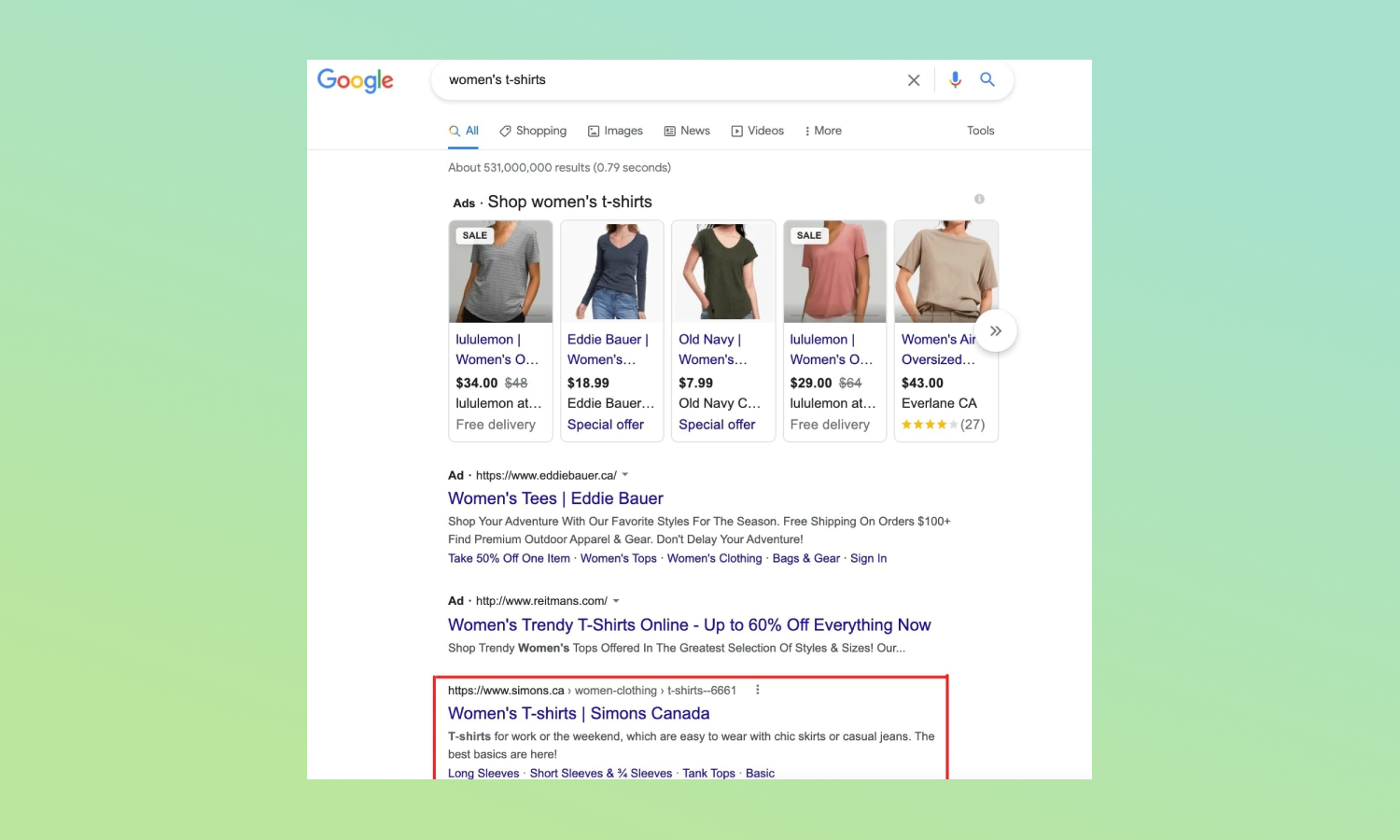
The page title is a prominent signal that helps search engines and users understand what a page is about. Write a distinct, descriptive title for every priority page and place the main topic near the beginning where it reads naturally.
For example, a category title might be Men’s Waterproof Walking Boots | Brand Name. A product title could include the product name, model and an important distinguishing feature. Avoid generic titles such as “Products” or using the same title across multiple pages.
Write useful meta descriptions
Meta descriptions do not directly determine rankings, but they can help persuade people to visit your page from search results. Summarise what the shopper will find, highlight a genuine benefit and use a clear, relevant call to action.
Keep descriptions accurate and specific. A category page might mention the range available, while a product page could refer to its key features or intended use. Search engines may show different text in results, so treat meta descriptions as an opportunity rather than a guarantee.
Create original product descriptions
Product descriptions copied from a manufacturer or reused across several products offer little extra value to shoppers. Write original copy that explains what makes each product useful and helps customers decide whether it is right for them.
Where relevant, include details such as:
- Materials, dimensions, sizing and compatibility
- Key features and practical benefits
- Care instructions or installation information
- What is included with the product
- Important limitations or suitability guidance
Make descriptions easy to scan with short paragraphs, clear headings and bullet points. Keep the tone informative and avoid making claims that cannot be substantiated.
Improve category pages
Category pages are often important entry points for broad product searches. Give each major category a clear heading and enough helpful information to explain what the range includes. A short introduction above the products can orient shoppers, while more detailed buying advice can sit below the product grid.
Make sure category names are clear and consistent. If a category contains filters for size, colour or other attributes, check that these options help people browse without creating large numbers of thin or duplicate pages for search engines to discover.
Use headings and page structure effectively
Organise each page with a logical heading structure. Use one clear main heading that describes the page, followed by subheadings for sections such as product details, delivery information or buying advice.
Headings should make the content easier to understand, not serve as a place to cram in keywords. Keep page copy focused on the shopper’s questions and ensure important information is available as text rather than only inside an image.
Optimise product images
Product imagery can help customers assess an item, but large image files may slow a page down. Use appropriately sized, compressed images and choose descriptive file names where practical. Add concise alt text to meaningful images so that their content can be understood by people using screen readers and by search engines.
Alt text should describe the image in context. It is not necessary to repeat a list of keywords or add descriptions to purely decorative images.
Make internal links useful
Internal links help shoppers move around your website and help search engines discover related pages. Link from relevant buying guides to product or category pages, and use breadcrumbs to show where a page sits within the site structure.
Choose link text that describes the destination. For example, “view our waterproof daypacks” is more informative than “click here”. Avoid linking every mention of a keyword; links should be useful to the reader.
Add structured product information
Structured data can help search engines interpret information about products, such as their name, price, availability and review details. Eligible pages may be considered for enhanced search results, although displaying these features is not guaranteed.
Keep structured data accurate and in line with the visible content on the page. Prices, stock status and review information should be kept up to date, and only genuine reviews should be marked up.
Handle out-of-stock and discontinued products carefully
Product availability changes, but deleting every unavailable product page can waste useful content and disrupt links. If an item is temporarily out of stock, keep the page live and clearly state its availability. Where possible, offer a notification option or suggest relevant alternatives.
If a product has been permanently discontinued, consider whether there is a close replacement. A relevant redirect may be appropriate when the replacement serves the same purpose. Avoid redirecting every removed product to the home page, as that can be confusing for shoppers.
Support a good mobile shopping experience
Many shoppers browse and buy on mobile devices. Check that product information, images, navigation and calls to action work well on smaller screens. Buttons should be easy to use, text should be readable and key details such as price and availability should be easy to find.
Page speed and usability also matter to the overall shopping experience. Review performance regularly, particularly on product pages that include large images, reviews or third-party features.
Measure and refine your work
On-page SEO is an ongoing process. Use analytics and search performance tools to monitor impressions, clicks, rankings and conversions. Review results by page type as well as by individual URL: a pattern across product pages may reveal a broader issue with titles, descriptions or page content.
Prioritise changes based on potential impact and effort. Improving a high-value category page may be more beneficial than updating dozens of low-demand products. Test changes over time and make sure any gains in search visibility also support a positive customer experience.
Conclusion
Effective e-commerce on-page SEO brings together clear page targeting, useful product information, well-organised categories and a smooth shopping experience. Start with the pages that matter most, make every element helpful to shoppers and keep product details accurate. Consistent improvements can make your online shop easier to find, understand and use.
8 On-Page SEO Tips for Ecommerce Product Pages
- Use unique titles and meta descriptions for every product page.
- Write clear, original product descriptions with relevant keywords.
- Add descriptive alt text to product images.
- Use short, readable URLs with product names.
- Organise products into clear categories and subcategories.
- Add structured data for products, prices and reviews.
- Link related products and useful category pages.
- Make product pages fast and easy to use on mobile.
Use unique titles and meta descriptions for every product page.
Give every product page its own clear, descriptive title and meta description. Include the product name and relevant details, such as its brand, model or key feature, so shoppers can quickly see that the page matches their search. A unique meta description can summarise the product’s main benefits and encourage people to visit your site. Avoid reusing generic text across multiple pages, and make sure every detail accurately reflects the product.
Write clear, original product descriptions with relevant keywords.
Write clear, original product descriptions that explain what an item does, who it is for and what makes it useful. Include relevant search terms naturally, alongside practical details such as materials, dimensions, features and care instructions. Avoid copying manufacturers’ descriptions or forcing keywords into the text: distinctive, helpful copy is more valuable to shoppers and gives search engines a clearer understanding of each product page.
Add descriptive alt text to product images.
Add descriptive alt text to product images so that people using screen readers can understand what each image shows, and search engines can interpret its context. Describe the product and any visible details that matter, such as its colour, style or distinguishing features. Keep the wording concise and accurate, and avoid stuffing it with keywords. For decorative images that add no useful information, use empty alt text so assistive technology can skip them.
Use short, readable URLs with product names.
Use short, readable URLs that clearly describe the product, such as /waterproof-walking-boots/. Including the product name helps shoppers understand what the page is about and makes links easier to recognise and share. Keep URLs concise, use hyphens to separate words, and avoid unnecessary numbers, parameters or repeated keywords. If you change an existing URL, set up a relevant redirect to help visitors and search engines reach the new page.
Organise products into clear categories and subcategories.
Organise products into clear, logical categories and subcategories so shoppers can find what they need without unnecessary clicks. Use familiar, descriptive labels that reflect how customers search, and keep related products grouped together. A well-structured hierarchy also helps search engines understand the relationships between your pages, making it easier to discover and index your product ranges.
Add structured data for products, prices and reviews.
Add structured data to your product pages to help search engines understand details such as product names, prices, availability and genuine customer reviews. Accurate markup may make your listings eligible for enhanced search results, helping shoppers compare options before they visit your site. Keep the structured data consistent with the information visible on the page, and update it whenever prices, stock levels or review details change.
Link related products and useful category pages.
Link related products and useful category pages to help shoppers discover relevant items and move easily through your online shop. For example, link a product page to matching accessories, alternative styles or the category it belongs to. Use clear, descriptive link text and place links where they genuinely help customers decide what to view next. Thoughtful internal linking can also help search engines understand how your pages are connected and find important content.
Make product pages fast and easy to use on mobile.
Make product pages fast and easy to use on mobile, where shoppers should be able to browse, compare and buy without unnecessary delays or hassle. Compress images, limit scripts and features that slow loading, and check that text is easy to read without zooming. Keep essential details—such as price, availability, delivery information and product options—clear and easy to find, with buttons that are simple to tap. A smoother mobile experience can help customers make confident decisions and complete their purchases.